
Run SimSolid Cloud from Onshape
Add SimSolid Cloud to Onshape and open a project.
- Login to your Onshape account.
- On your personal Onshape page, open any CAD document.
-
In the application window, click
 > Add application > SimSolid Cloud to invoke the Project Dashboard.
Figure 1. 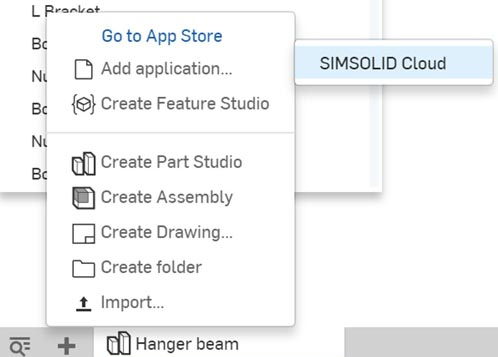
-
In the Project Dashboard, click Add Project.
A dialog opens, filtered to display the Part and Assembly studios present in the current document.
-
Select a Studio, then click Open.
The Project Window opens and displays the chosen CAD.Note: SimSolid Cloud imports the full assembly topology (assembly, sub-assembly, part and face) but uses facet and not surface data to describe the part boundary. Faceting is done as each model is accessed. For more information on adjusting faceting parameters see Set Face Faceting Parameters.