Morphing
New Features
- Thickness-based offset
- When mapping nodes to a target mesh in the Free and Proximity morphing
tools, you can now use automatic offset distances based on mesh
thicknesses at each node. After selecting the Target entities, you can
choose one of three different methods in the Targets microdialog to
define the offset.
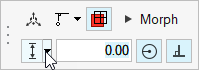
Figure 1.- Custom offset distance
- Average thickness (t1 + t2)/2, plus custom offset value
- Average thickness (t1 + t2)/2, multiplied by custom offset value
Enhancements
- Map to plane
- A new Plane entry has been added to the Targets selector inside the Free
and Proximity morphing tools. Use this selector to map nodes to a custom
infinite plane.
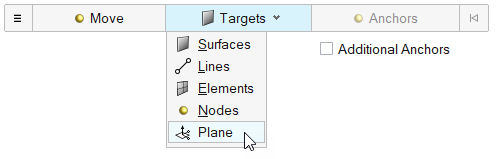
Figure 2.
Resolved Issues
- Delays when launching morphing tools on a fresh session have been resolved. These were caused by a licensing-related service which has since been improved.
- An issue where using double-click to enter the reposition mode of the Move manipulator was not working has been resolved. Now, either Shift or double-click can be used to reposition the manipulator in any of the morphing tools (as in the rest of the product).
- Missing fading effect when entering the reposition mode of the Move manipulator has been fixed.
- An issue where it was not possible to create multiple design variables from multiple selected shapes in the Shapes tool has been resolved.
- Restore default options button not working in the Volume morph tool has been fixed.
- Resolved an issue where the split/combine microdialog would sometimes not come back after performing undo operations.