Meshing
New Features
- Bulkhead
- A new tool has been added under 2D Mesh in HyperWorks to create bulkheads that provide localized performance benefits for multiple design attributes. For example, NVH, Safety, and so forth. With minimal input, a bulkhead can be created at a user-defined location along with their respective parameters.
- 1D Mesh Property Update
- A new tool has been added under 1D Mesh in HyperWorkscalled Section Property. It is exposed
for OptiStruct and
Nastran solvers only. It
enables you to update properties with beamsections and materials as a
result of a section cut in a model. The source entities can either be
surfaces, solids, or elements (mix of shells and 3D solid elements).
- 1D elements are not yet supported as source for cut.
- Multi materials are supported but not composite layered shells.
- Shells are inflated to represent actual shape.
- Contact definition enables you to glue disconnected parts.
- Shear Center and material weighted neutral axis are calculated.
- A generic beamsection is created along with an auto-calculated material to account for correct stiffness terms.
- Beam element is offset to account for element grid position with respect to its shear center.
- Limitation: section cut has a temp graphic in the tool but not
yet saved in a persistent way.
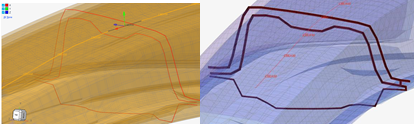
Figure 1.
- Box Trim Tool Added under Elements Ribbon
-
- With this new tool you have more control and flexibility, you can add more than one graphical box, and those boxes can be edited and moved interactively within the graphics area. Later, those box faces (planes) are used for trimming of the complete model, or the selected subset.
- Graphical boxes can be quickly edited based on “Box Type” and “Re-Oriented” with respect to global axis or with respect to “best fit” method. This helps to quickly visualize and make modifications before actual trimming.
Enhancements
- BatchMesher/Rebuild
-
- Support for rectangular/square, ellipse, slots, and mixed hole shapes added for identification and various treatments (seeding, washer creation, and removal).
- Tria reduction and mesh flow improvements around free edges, non-manifold edges, and washer regions.
- Edit Elements Tool
-
- Remap functionality added to Edit Elements tool. Remap a series of nodes to a selected line list, the nodes become evenly distributed across the line and you can select a set of nodes by path and perform the Remap action.
- In the Move tool you can type the value in the micro dialogue to
move/optimize the node in the normal direction as shown
below.
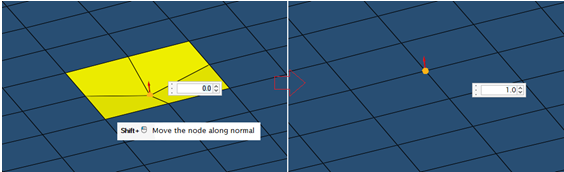
Figure 2. - In the case of hole/washer modify, the default preserve feature is added and rebuild mesher is called for re-meshing.
- The Split tool is enhanced to consider splitting underlying free edges and 1d elements by default. In the case of fillets, middle nodes would be projected to the parent surface.
- Angle based correction method added under smooth function and miscellaneous bug fixes done for Edit Elements functionalities.
- Thickness mapping tool is enhanced for Fixed interval method to provide more control of thickness grouping.
- Added an option to create mid-edge using discontinuous guidelines in Midmesh Create Mid Edge tool.
Resolved Issues
- Mesh flow issues corrected while splitting elements in midmesh using node-to-node or node-to-shortest edge method.
- Fixed bug related to Morph and Auto method in Replicate tool.
- In the General 2D Mesh tool, corrected "Esc" behavior when using the Esc key. Instead of directly closing the tool, now it takes you to "Create", where you can select new surfaces/elements to redo meshing steps.
- Reverse coloring allowed in HyperWorks legend.
- General bug fixes and robustness improvements.