Model Build
New Features
- Instance Filter
- Part Browser now has a predefined instance filter
that filters to show instances only. Based on selection, the filter
returns either all instances in the model, or siblings of the selected
instance. This predefined filter can be accessed from a list of queries
or manually applied.

Figure 1. - Context Menus
- Part Browser- and Subsystem Browser-specific context menu options are now available by right-clicking in the graphics area when in idle .
- Representation Save Comments
-
- When saving Parts or Subsystems, you can now add a user-defined comment to assist in record keeping and track the changes made between revisions.
- The history of comments can be reviewed in Library Viewer.
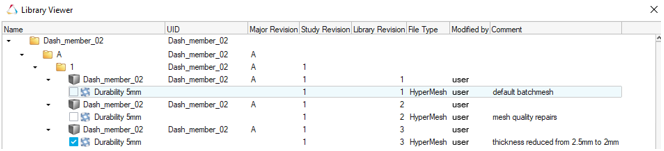
Figure 2.
Enhancements
- Subsystem Browser Updates
- The Subsystem Browser now follows paradigms set by the Model Browser and Include Browser and brings all the
functionalities of those views to the Subsystems.
- This provides a clearer understanding of each Subsystems content since all entities are shown in the browser including Node, Element, and Connector counts.
- Subfolders by Card Image for each entity type.
- Invoke new view on double-click of folders for subsystem
specific views. Example:
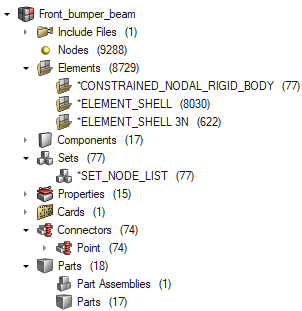
Figure 3.