Browsers
New Features
- "Modified" predefined filter for Includes
- "Modified" predefined filter under Includes view facilitates filtering
and finding the include files that have been modified post previous
solver deck export operation.
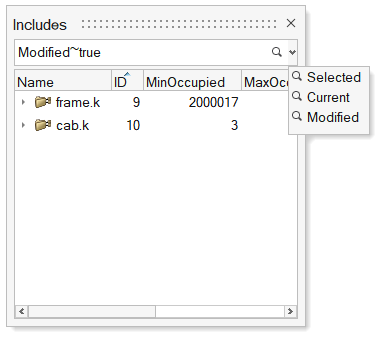
Figure 1. - "Instances" predefined filter for Parts
- "Instances" predefined filter in Part Browser
facilitates filtering all part instances. Applying the "Instances"
filter without any selection returns all part instances, while applying
the "Instances" filter by selecting a part instance returns just the
instances linked to the selected instance.
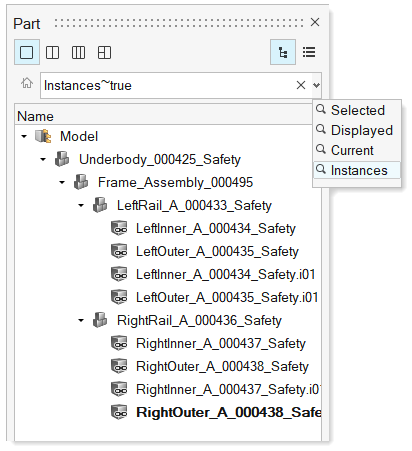
Figure 2.
Enhancements
- Export CSV/HTML report
- Exporting of model data as a CSV/HTML report is now supported all flat list browsers.
- Select All/Reverse in browsers
- Added "Select All" and "Select Reverse" context menu options in all flat list browsers. Keyboard shortcuts "Ctrl + A" and "Ctrl + R" can also be used to perform All and Revers selection, respectively.
- Indirect to direct property conversion
- Conversion of indirect property assignment to direct property assignment is now supported for multiple component selection, even when the selected components have different indirect properties.
- Search hint in search bars
- The search hint in the browser search bar now indicates the entities that are being searched/filtered.
- Find Unused/Empty entities
- Unused and Empty entities can now be found by right-clicking in white space in all the flat list browsers.
- Find an attribute with empty value
- All attributes with empty values can now be filtered by selecting <Empty> as the value from suggestion list.
- Find out-of-sync revisions
- All representations that are not in sync with library can now filtered using “*” in the Revision column filter in the Part Browser.
- Create Load Collector without keyword
- A Load Collector without a keyword can now be created by selecting the Collector option from the "Create" context menu list.
- Find references on nodes
- Entities referenced to a node can now be queried using the References context menu option in Nodes view.
- Delete entities from Reference Browser
- Entities can now be deleted from the Reference Browser while checking references.
- "Views" in Model Browser
- "View" entity is now shown in the Model Browser. Double-click on the Views folder to access the list of views.
- Card creation from Model Browser
- In OptiStruct and Nastran interfaces, the CaseControl, Output, and
Param options under the "Create" menu are now consolidated into the
"Cards" category.
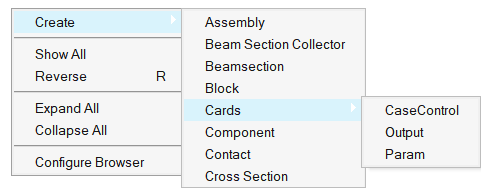
Figure 3. - "Organize" to "Move to Current Include"
- The "Organize" option under Includes view is relabeled as "Move to Current Include" in all interfaces except LS-DYNA and Radioss.
- Matrix Browser syncing
- Table entity content is fully in sync with the Matrix Browser generated table.
Resolved Issues
- Entity views are now restored on relaunch of HyperWorks.
- Fixed performance issue with show/hide/isolate of components in components view.
- Fixed performance issue with moving components into assemblies.
Known Issues
- Elements and nodes selected in graphics are not highlighted in browser.
- Entity editor is not cleared when an entity is removed from a filtered browser list.
- Nodes are not shown in the correct include when components are dragged and dropped across includes.