Support of Nastran/OptiStruct/MADYMO result files in HDF5 Format
Synchronize Result Step Tool for comparing Linear and Modal animations
across windows
Command Recording enhancements
New Features
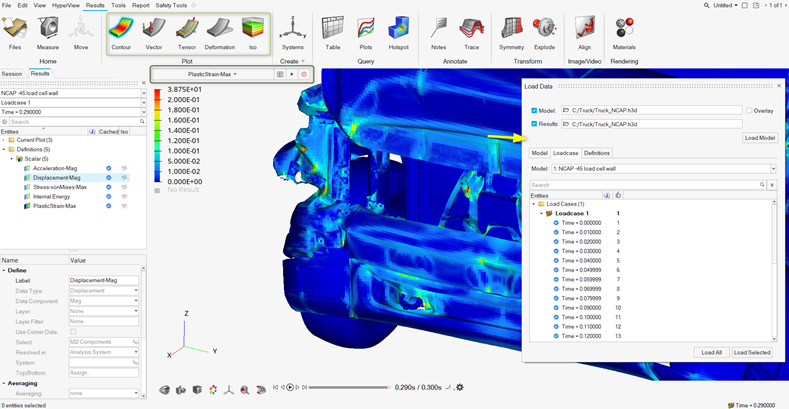
HyperView Upfront Loader Workflow in HyperWorks
HyperView with Upfront Loader, which was first introduced in v2020 in
the HyperWorks Desktop interface, is now available with a revamped
workflow in HyperWorks. There is a direct start menu shortcut and a
dedicated invoke script to launch this profile on Windows and Linux
respectively. Figure 1.
Some highlights and key benefits are:
Uses a multi-threaded, asynchronous data loading engine
resulting in faster load times.
New Load Data Dialog designed to:
Select upfront and load only animation steps and results
data of interest
Load several results at once, monitor load progress and
cancel loading.
Loaded data is automatically cached and readily available for
viewing.
Option to unload cached data when no longer necessary.
Interact with the application and perform other tasks while data
is loading instead of waiting until loading completes.
Monitoring to warn if the application memory usage reaches a
certain threshold and cancel any ongoing loading.
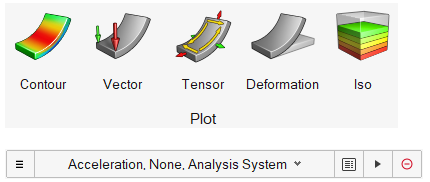
Graphical user interface: new workflows for plotting and
visualizing contours, vectors, tensors, iso and deformations are
available through the Plot Ribbon. Figure 2.
Note: There is a separate shortcut/invoke script to launch this
profile and one cannot switch the session back to standard
HyperView. Also, certain HyperView tools are not available in this
profile and only transient analyses post processing is supported.
For additional details, please consult the User Guide and refer to
the Known Issues section (below).
Starting in v2021.1, the
Upfront Loader workflow will be officially supported only in
HyperWorks and will no longer be available or supported in the
HyperWorks Desktop interface.
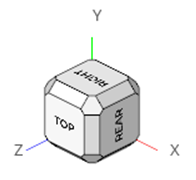
View Cube in HyperView
The View Cube is now available in HyperWorks – HyperView, giving you
direct access to standard views along with many more variations and
orientations of standard, isometric, and edge views. Configure the view
cube in File > Preferences > Appearance. Figure 3.
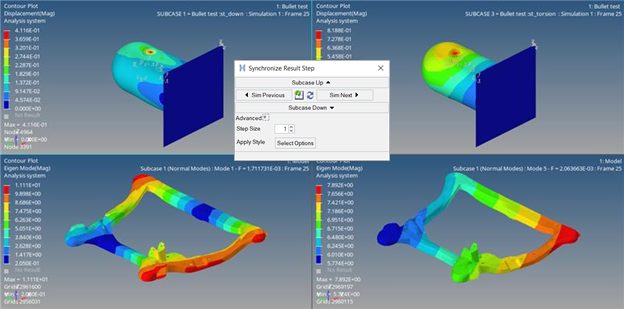
Synchronize Result Step
Synchronize Result Step is a useful tool to synchronize subcase and
simulation steps across models in multiple windows. It is available for
linear and modal animation modes, where a typical use case is to compare
iterations side by side for different modes. This tool is currently only
supported in the HyperWorks Desktop interface and is available from the
Tools menu. Figure 4.
Enhancements
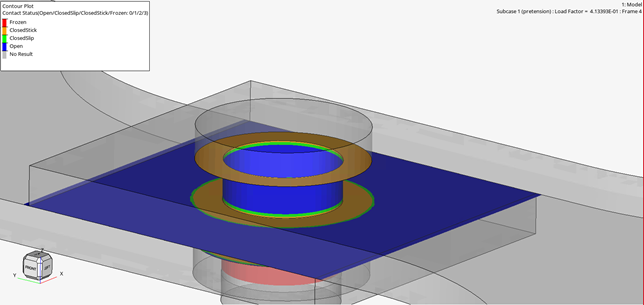
Contact Status Plot
The contour plot when plotting Contact Status result type in OptiStruct
and Abaqus results will now display a legend showing the contact status
categories instead of a simple numeric legend. This will allow you to
better understand the contact condition. Figure 5.
Selection Highlighting in HyperWorks - HyperView
The selection highlighting of various entities such as elements and
components has been updated. The selection color can be chosen via File
> Preference > Appearance and the transparent highlighting is also
possible via File > Preference > Performance.
Record and Playback
For HWC commands - limiting the number of commands in the
command history has been added.
Recording the view using the shortcut "V" now makes it easier to
create HWC command files interactively.
Known Issues
The following known issues with the HyperView - Upfront Loader tool will be addressed
in a future release as software performance improvements continue to be made:
Session files/report templates saved in standard HyperView are incompatible
with HyperView – Upfront Loader. An error message will be printed, and file
loading will be stopped in the case of opening or replacing an existing
session, but in the case of import or the append option, the loading process
could potentially become very slow. Therefore, it is strongly recommended to
avoid loading standard HyperView mvw/tpl files in the Upfront Loader
profile.
Iso tool is not in sync with Definition plotted when an Iso plot is added
from Legend context menu.
Resolved Issues
Display Reverse option in the Visibility Controls toolbar not working
properly when assemblies are present (HyperWorks Desktop).
Clearing the sets does not update the components count in Sets View.
Component Display icon does not update when Component sets are
hidden/shown.
Section cut remains active when working with Extract and Linearize
tool.
Animation performance drops when intersection is enabled in the Extract and
Linearize tool.
Notes move during capture operation depending on the resolution.
Deformation scale factor affects contour resolved in tracking system.
Free body diagram tool fails to invoke if model contains only solid
elements.
HyperWorks - HyperView: Material appearance dialog closes after selecting a
material.
HyperWorks – HyperView: Animation starts updating automatically on hovering
over the Animation toolbar slider after performing certain operations in
Idle context.
HyperWorks - HyperView: Application crash seen in some cases when accessing
an FBD summary table.
Application error when processing orphan nodes in the contour measure curves
tool.
Legend graphics context menu does not set numeric format and other options
properly.
Deleting overlaid models does not remove notes attached to it leading to an
application error.
Command Recording: Set with commas and space is not created while executing
commands via Tcl.
Command Recording: Wrong value shown in animation control panel when
animation increment of non-active modes is changed using command API.
Command Recording: Commands not recorded for Section cuts defined by
N1-N2-N3 plane option.
Command Recording (HyperWorks – HyperView) : Commands run via Tcl file is
recorded in HWC console.
Command Recording: "result scalar" command does not record complex
filter=<filter>.
Command Recording: HWC Report overlay/append does not consider parameter
values.
HyperWorks – HyperView Upfront Loader: Cached result definition data does
not get unloaded when simulation steps are unloaded.
HyperWorks – HyperView Upfront Loader: Plot resolved in tracking system are
not handled properly when tracking systems are deleted and new ones are
added.
HyperWorks – HyperView Upfront Loader: Component colors are not retained
when saving MVW/TPL files.
Flexbody Stress requests are unavailable when H3D file has greater than one
Flexbody.
Memory usage for HVTrans translation is higher in v2021 compared to
v2020.1.
Hotspot Finder does not find hotspot with Bottom N entities.
Application error occurs on export of solver deck (in Pamcrash and
OS/Nastran formats) from HyperView.
Application error on clicking Color button in the Entity Attributes panel
with no model loaded.
Unable to set a view from the view tool or views in browser if views are
saved with numeric label.
Warning messages keep popping up when switching from a page without FBD
browser to a page with one open.
Entity selector and graphical selection get out of sync after the Hotspot
finder dialog is closed and opened.
HyperView Player: Application error when clicking on Realistic Rendering
option in Display Control icon.
Safety Tools
Enhancements
Pedestrian Tool
Pedestrian Post now supports first-sight report PPTX creation for all
Impactor types, containing the following enhancements:
Run Statistics (Summary table listing Normal vs Error
termination per impact location)
Overall Injury Summary (Summary Table listing Injury summary for
all impact locations)
Overall Injury Map
Detailed Report
Solver Interfaces
Abaqus Interface
New Feature
Abaqus 2021 Reader
HyperView now supports post-processing Abaqus 2021 ODB files.
ANSYS Interface
Enhancements
Reader Enhancements
ANSYS version 2021R1 .rst files
supported.
Support of .rst files generated from the
RSPLIT command.
LS-DYNA Interface
Enhancements
Reader Enhancements
LS-DYNA Femzip reader library upgraded to version v11.00.
MADYMO Interface
Enhancements
Reader Enhancements
MADYMO reader now supports HDF5 files.
Nastran Interface
Enhancements
Reader Enhancements
New reader to support HDF5 files (.h5) generated from the Nastran
solver.
OptiStruct Interface
Enhancements
Reader Enhancements
New reader to support HDF5 files (.h5) generated from the OptiStruct
solver.
Resolved Issue
Contour values displayed as 0 instead of N/A for fake rigid body modes.
PAM-CRASH 2G Interface
Enhancements
Reader Enhancements
Summary
Supported Format
DSY and Femzip-DSY reader corrections to avoid
showing nonexistent results and support of new data
type results.
DSY and FEMZIP-DSY
Radioss Interface
Enhancements
Reader Enhancements
Radioss FEMZIP reader library upgraded to version v11.27.
Reader enhancement to support 3 node and 4 node spring elements
when importing a Radioss input deck.