Altair HyperMesh 2022 Release Notes
Aeroelasticity
Enhancements
- The position of engine mesh can be aligned as desired using location selection and the Move tool.
- Aeroelasticity set (AELIST) is exported in sorted ascending order of aero element IDs. It is a requirement for solvers.
- Monitor points can be created by selecting a predefined set of sets (AECOMP).
- The Name field is removed from microdialogs for all aeroelasticity tools to be in consistent with other tools. The name can be changed through the Entity Editor. Also, the ID field is removed for Spline, control surfaces, and monitor point tools.
- Tool tips are provided for all aeroelastic entities and their fields through the Entity Editor.
- Removed the Model system option from the CAERO1 Panel Mesh hamburger menu.
- Airbus: Panel meshing using the "Panel mesh" tool is enhanced by direct
selection of LCS. Also, the Move tool has been incorporated to position
panes and their chord sizes before meshing. LCS can also be selected through
a microdialog to define a panel in a local coordinate system. The same Move
tool is used to edit and remesh panels under edit mode.
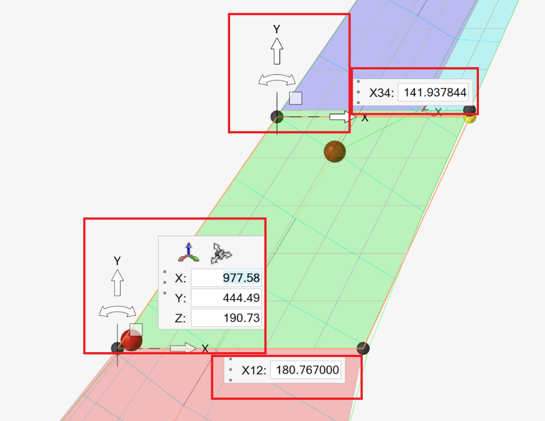
Figure 1. - With the help of location selection and the Move tool, aero bodies can be positioned at the right location before meshing. The same can be repositioned under edit mode by using Move tool as well.
- Location selection and the Move tool are now used to position monitor points.
Resolved Issues
- A performance issue with body/panel meshing on bigger models is resolved.
- An unexpected import warning while importing HMNAME COMP is fixed.
API
Browsers
Certification
Composites
Connectors
New Features
- Post Script Removal
-
- Any realization without a post script will now automatically create properties and materials dependant on the element in the body of the realization.
- The property option "None" has been removed; it is now
simplified to specify a Property/Material or leave it
undefined.
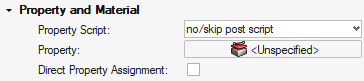
Figure 2. - The following realizations have had their post scripts set to
No/Skip when created through Controls as they are no longer required:
- Spot Types
-
- acm (detached-(T1+T2)/2)
- acm (equivalenced-(T1+T2)/2)
- acm (general)
- acm (shell gap)
- Bolt Types
-
- bolt (2 cylinder rigid)
- bolt (b31)
- bolt (cylinder bar)
- bolt (cylinder rigid)
- bolt (step hole)
- bolt (threaded step hole)
- BUSH cylinder
- hinge
- hinge (b31)
- Line Types
-
- adhesive-hemmings
- adhesives
- HC mig weld
- hexa (adhesive)
- hexa (RBE2-RBE3)
- rigid (crbody) HC laser
- Connector Imprint Generalisation
-
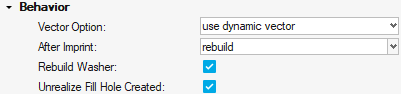
Figure 3.- Rebuild is now available post imprinting for better a quality mesh.
- Rebuild is now optionally available for the Washer if it interacts with feature edges to improve mesh quality.
- If a Bolt connector creates a hole during realization, it can now be filled on unrealization.
- Metadata Mapping from Parts
- Allow the metadata on a given part to be mapped to the connector as
links and metadata.
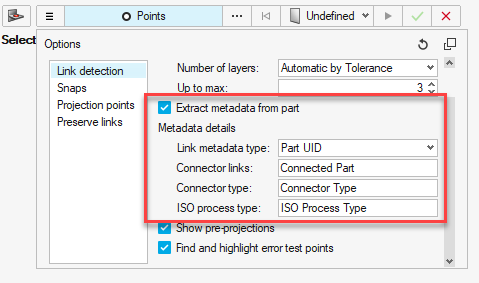
Figure 4.
Enhancements
- Realizations
-
- Bolt(Metal Clip) has undergone a significant upgrade:
- The body elements can be changed within the control/connector.
- Any change in the vector is now remembered locally on the connector with the use of the "Overwrite Attribute" flag.
- Materials and Properties can now be selected and filtered from a default location.
- The tower and hole elements are placed in a contact set in LS-DYNA and PAM-CRASH.
- Hexa Imprint (adhesive contact) + Penta Imrpint (adhesive
contact)
- Contact type changed to Shell Edge to Surface in LS-DYNA.
- Part Set is now default for the Secondary set in LS-DYNA.
- Bolt(Metal Clip) has undergone a significant upgrade:
- xMCF
-
- A new mechanism to add HyperMesh information into the xMCF format has been added under the export option "App Data Block". This will export the Connector details including the Connector Controls.
- A new mechanism to add the Realization information into the xMCF format has been added under the export option "FEM Data Block". This will export the element types and references into the FEM Data Block. It will also add the PID of the realization.
- Property Links historically have been converted into Component links when exporting xMCF. This has been reverted and will now directly export the links as Property References.
- Workflows
-
- "Create New" in the Connector tools now say "Create New/Edit" when controls exist.
- "Create New" now creates a control if there are no controls.
- Double clicking connectors in the Model Browser now filters the Connector Browser.
- Instance links now shown on Attachments in the Connector Browser.
- Absorption
- Absorbing connectors allows the assignment of the property to the
connector during the absorption process.
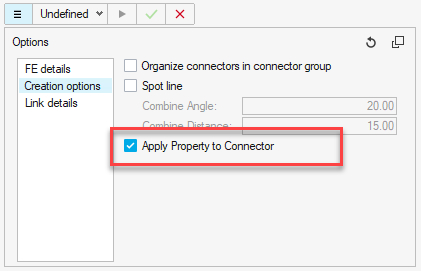
Figure 5.
Resolved Issues
- xMCF Clip are now classified as a Bolt, in line with the realization types.
- For a spot line where each spot can fail independently of the rest of the line, a "Partial Realisation Option" has been added where X% of the Connector needs to realized for the Connector to be marked realized.
- Systems created in Spot Lines will now have the Z axis follow the Spot Line Direction.
- Merge Lines in the Create tools now no longer require all the lines to be selected at once.
- Attachment REM issues fixed for Attachments that are referenced.
- Loading Parts with Connector Groups as instances was causing a crash. This has now been fixed.
- Attachment performance has been improved with unrealizing/realizing and creation.
- Importing a Binary or XML of Connectors or Attachments where the Part ID no longer exists was causing the UID to be lost. This has now been fixed.
- Connector Lines/Spot Line XMLs are now independent of the pitch size. The accuracy of the shape of the line should not change when exporting/importing.
- Connectors when realizing to a Solid mesh were selecting internal faces. They will now only realize to external faces of the Solid mesh.
- The option to realize the internal/external face of a Solid mesh is now available. The option is on the Connectors/Controls as "Solid Outer Face".
- When saving Attachments into a Connector Group, the Controls were not saved with the Connector Group. This has now been corrected and the controls are saved.
- Absorbing Connectors with links that are instances of the same part will now append each instance of the part to the Connector.
- Connector Lines/Spot Lines now have different End Offset options. The
graphics have been updated to indicate directionality of the Connector.
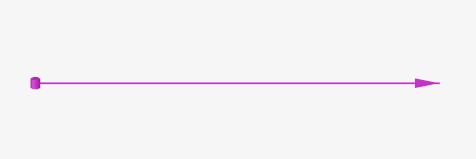
Figure 6.
Design Explorer
Design Space
Fields
Enhancements
Supports direct results mapping for:
- H3D
General
Geometry
Matrix Browser
Enhancements
- Multiple result queries can be executed while in the Matrix Results Query dialog without the need to reopen the dialog.
- Macro recording supports HyperMesh result queries.
- GUI enhancement allows adjusting the frame split position between the table and the query columns.
- Added support for the following element data names: refx, refy, refz and plylist.
- You can now choose to populate the entity query ID column in an increasing or decreasing order. By default, the entity IDs are returned in the order they have been generated in the HyperMesh database.
- Matrix settings have been moved to the Post section of the general Preferences dialog.
Resolved Issues
- Certain integer type data names were previously reported as floating values. They are now correctly returned as integers.
Meshing
Model Build
Model Verification
Morphing
Post
Enhancements
- Official support of ANSYS and Abaqus solver profiles for plotting workflows (beta flag has been removed)
Resolved Issues
- Major fixes for results contour on mid-side nodes for 2nd order elements
- Fix of 1D vector orientation
Safety
Solver Attribute Mapping
Solver Conversion
Enhancements
- Abaqus to OptiStruct conversion
-
- CPS4 and CPS3 elements converted to CQUAD4 and CTRIA3
- FRICTION converted to PCONT, FRICSEL
- GASKET material converted to MGASK, TABLEG
- ROTATION joint converted to ROTATION joint
- CARTESIAN, ROTATION converted to CARTROTA joint
- Nonstructural Mass converted to NSML1
- HEADER in the include file is moved to master include on conversion
- TIMEPOINTS converted to NLOUT, TIME, SET,<NUM>,time, list
- Tags are retained on conversion
- Radioss to OptiStruct conversion
-
- /MAT/PLAS_TAB material converted to MATS1,TABLEMD
- TYPE2 contact converted to TIE contact
- Abaqus to Radioss conversion
-
- SUPERELASTIC material converted to LAW71
- General Contact converted to TYPE24 OR TYPE25
- Pamcrash to Radioss conversion
-
- MPART(Type=Solid) converted to /PROP/SOLID
- MPART(Type=Shell) converted /PROP/SHELL
- CNTCT33 converted to TYPE7
- GROUP(components) SURF/PART/EXT
- Basic Entity Mapping
- Sets and contacts card images are mapped on switching profiles across
the following interfaces:
Abaqus, OptiStruct, Nastran, NX Nastran, Ansys, Dyna, Pamcrash, Radioss, Permas, Samcef, and ADVC
CAD and Solver Interfaces
EXODUS Interface
New Features
- Auto-contact is now available for the EXODUS user profile.
- Mesh Group entity supported.
Enhancements
- All function/curve types can now be defined in EXODUS profile.
Known Issues
- Mesh groups can be defined on blocks, sidesets, and node sets but not on another mesh group.
- Direct property assignment
Resolved Issues
- Upon changing element order, update the distribution factor for sidesets.
LS-DYNA Interface
New Features
- New Integration Rules entity
- LS-DYNA keywords *INTEGRATION_SHELL and *INTEGRATION_BEAM, previously supported in Property entity, are now mapped to their own entity.
- New Perturbation entity
- LS-DYNA keywords *DEFINE_STOCHASTIC_VARATION and *DEFINE_STOCHASTIC_VARATION_PROPERTIES, previously supported in Property entity, are now mapped to their own entity.
- New Frequency entity
- LS-DYNA keywords *FEQUENCY_DOMAIN_(OPTIONS) are now supported and mapped to the new Frequency entity.
Enhancements
- New Keywords
-
- *CONSTRAINED_LINEAR_GLOBAL
- *CONSTRAINED_LINEAR_LOCAL
- *DEFINE_FUNCTION_TABULATED
- *EOS_JWLB
- *EOS_MIE_GRUNEISEN
- *EOS_GASKET
- *EOS_MURNAGHAN
- *EOS_PHASE_CHANGE
- *MAT_MODIFIED_JOHNSON_COOK (*MAT_107)
- *MAT_DAMAGE_3 (*MAT_153)
- *MAT_MUSCLE (*MAT_156)
- *MAT_MOHR_COULOMB (*MAT_173)
- *MAT_NON_QUADRATIC_FAILURE (*MAT_258)
- *PART_AVERAGE
- *SENSOR_DEFINE_FUNCTION
- *SET_NODE_LIST_SMOOTH
- Updated Keywords
-
- Update in *CONSTRAINED_INTERPOLATION to support independent nodes with a *SET_NODE when ITYP=1
- LS-DYNA R11.1: New ELFORM value in *SECTION_SOLID
- LS-DYNA R12.0: Updates in *EOS_GRUNEISEN and *EOS_TABULATED_COMPACTION
- Solver Mass entity management
- A new option in the Appearance Preferences allows you to display the graphics on nodal masses defined inside the *ELEMENT_MASS Solvermass entity.
Resolved Issues
- Export Solver Deck feature, when selecting a material linked to multiple MAT_ADD cards: all linked MAT_ADD keywords are now exported with the selected material.
- Removed Title checkbox in *DEFINE_FUNCTION keyword Entity Editor.
PAM-CRASH Interface
New Features
- PAM-CRASH Solver Version 2021
- The latest new Pamcrash2G2021 solver profile is now supported.
- Export Solver Deck
- New context menu option Export Solver Deck available for all solver entities in the browsers (Model, Entity View, Solver). Export selected entities and all their references directly to a solver deck.
- New Friction Entity
- Keywords FRICT and FRITAB are now supported as a dedicated Friction entity type and moved out from the Property entity type. Also, the assignment of the friction entity is enabled in the PAM-CRASH Contact and Slipring keywords.
- New Keywords
- FRITAB/
Enhancements
- Friction Entity Selection
- The assignment of the friction entity is enabled in the PAM-CRASH contact and slipring keywords; this is after FRICT and FRITAB keywords mapped to new Friction entity type.
- Removed Solver Profiles
- Legacy PAM-CRASH solver profiles Pamcrash2G2012, Pamcrash2G2013, and Pamcrash2G2014 are removed. Templates are available only in the installation; however, they are no longer maintained.
- Updated Keywords
- FRICT /
CNTAC
SLIPR /
Radioss Interface
New Features
- Radioss V2022 Profile
- The new Radioss 2022 profile is added and supports the latest solver version.
- Unit Conversion
- The new unit conversion tool in the Model ribbon provides an efficient way to convert a model from its original unit system to a new unit system.
Enhancements
- New Keywords
- The following Radioss keywords have been added:
- Updated Keywords
- The following Radioss keywords have been updated accordning to the latest solver manual: