実行オプション
OptiStructでRadioss最適化入力ファイル<name>.radoptを実行するには、–radopt実行オプションを使用します。これにより、OptiStructは同じ作業ディレクトリ内でRadioss StarterおよびEngineファイルを探します。
Use Solver GUI
入力ファイルとして<name>.radoptを設定し、オプションとして"
-radopt」を使用します。OptiStructによって用いられるSMPコアの数を指定するには、
-ntオプションを使用します。Radiossの場合、-rntと-rnpを使って指定します。これは、Radiossシミュレーション実行時の-npおよび-ntオプションと同じです。- ソルバースクリプトを使用する場合(Linuxマシン)
[optistruct@host~]$ $ALTAIR_HOME/scripts/optistruct <name>.radopt -radopt- OptiStructソルバースクリプトを使用する場合(Windowsマシン)
[optistruct@host~]$ $ALTAIR_HOME/hwsolvers/scripts/optistruct.bat <name>.radopt -radopt- Radiossソルバースクリプトを使用する場合(Windowsマシン)
[optistruct@host~]$ $ALTAIR_HOME/hwsolvers/scripts/radioss.bat <name>.radopt -radopt- 実行モジュールへの直接コールを使用する場合(Linuxマシン)
[optistruct@host~]$ $ALTAIR_HOME/hwsolvers/optistruct/bin/linux64/<optistruct_executable> <name>.radopt -radopt- 実行モジュールへの直接コールを使用する場合(Windowsマシン)
[optistruct@host~]$ $ALTAIR_HOME/hwsolvers/optistruct/bin/win64/<optistruct_executable> <name>.radopt -radopt
StarterおよびEngineファイル(<name>_0000.radおよび<name>_0001.rad)が、<name>.radoptと同じディレクトリに置かれている必要があります。
/DTPLでMMOCID=1を使用するMMO(Multi-Model Optimization:マルチモデル最適化)の場合、以下に示すコマンドで実行します。
[optistruct@host~]$ $ALTAIR_HOME/hwsolvers/optistruct/bin/win64/<optistruct_executable> -mmo <name>.fem例:
最適化では2つの荷重ケースが考慮される必要があります。そのうえで、各荷重ケースについてはRadioss最適化ファイル
<name>.radoptを作成し、MMOの定義には、下に示すように
.femファイル(この例では
mmo_topo.fem)を作成します。下記でMMOを実行します:
[optistruct@host~]$ $ALTAIR_HOME/hwsolvers/optistruct/bin/win64/<optistruct_executable> -mmo –mpi –np 3 –rnt 2 mmo_topo.fem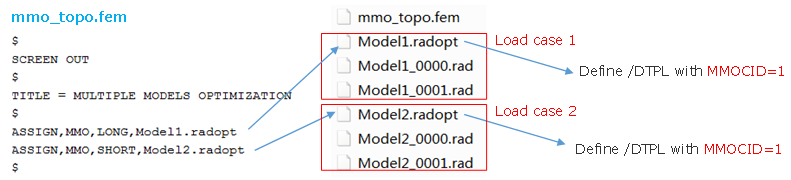
図 2.