|
»Click here to display Table of Contents«
|

To check a Mig weld |

|

|

|

|
|
To check a Mig weld |
|
|
|

|
|
»Click here to display Table of Contents«
|
To check a Mig weld |
|
|
|
|
|
To check a Mig weld |
|
|
|
|
| 1. | From the Menu Bar, select Connections > Mig Weld > Criteria. |
A MIG Weld Criteria dialog opens.
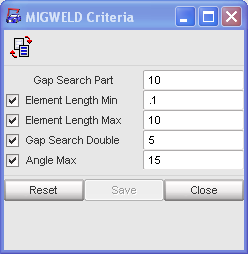
| 2. | Select the appropriate criteria to check by clicking the appropriate check box. |
| 3. | Enter the desired values for each parameter (It is recommended to use the default values). |
| 4. | Validate in the pop-up dialog window with Save. |
| 5. | To reset to the default values, click Reset. |