Model Verification
New Features
- Merge Excels – This function lets you combine multiple comparison Excel
reports into one file. Keeps existing Excel reports but creates a new merged
Excel report.

Figure 1. - Units – Comparison function that will convert all model units to mm and
perform comparisons.
- Comparison tool will convert Length units to mm while importing the CAD model.
- Supported for Assembly and CAD inputs.
- Meter vs MM and Meter vs Meter are converted to MM vs MM.
- Auto converted without input required
- Part Revision – Supported in Comparison and Verification.
- Revision information is read from Metadata and displayed in the browser and Excel reports.
- Revision numbers can be compared in an Excel report.
- BOM comparison supports Part Revision attributes.
- You can edit the Part Revision attribute name.

Figure 2.
Enhancements
- Quick Comparison extended to CAD vs CAD.
- Comparison works similarly to CAD vs FE or FE vs FE.
- Results are displayed in the graphics area with contours showing matched/unmatched surfaces.
- Performance is better than the default option.
- Read Metadata – Metadata values that can be read from Assembly or CAD
files.
- PartNumber, PartName, Material, Thickness, Revision and other attributes names can be modified from the Config file.
- If the readMatThk option is ON, and if the PDM
attribute values are empty, the part attributes values from the
Metadata are given preference.
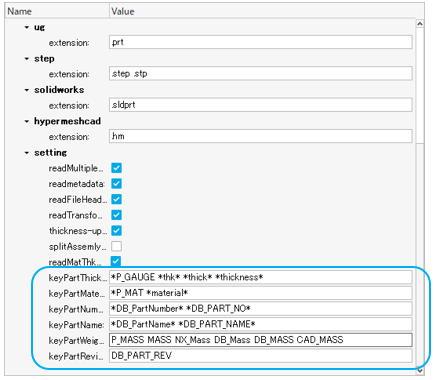
Figure 3.
- Comparison methods added – PartNumber, PartName, and PID based
comparison.
- While performing a comparison, parts that need to be compared are auto searched. This option is used to force the search criteria based on these 3 methods.
- Performance is improved.
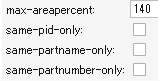
Figure 4.
- BOM Comparison – Attributes that can be compared excluding the topology.
- Part attributes are compared excluding topology.
- You can select any attributes to compare.
- Reports generated in PPT and Excel with H3d.
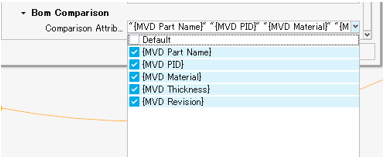
Figure 5.
- Report enhancement – Comparison PowerPoint report enhanced to have detailed
view on the results.
- Summary slides shows results in detailed view with color mapping.
- Unmatched+Partial matched parts export option available for the report generation.
- Matched parts in transparency and unmatched parts in shading mode available.
- Miscellaneous enhancements:
- Extend spotcomparison to support Opti format.
- Thickness,Match%,Base thk,Weight values are now shown in 2 decimals in all the reports.
- Match function - Split Multi Solids, Multi Comps to Single Part.
- Connection Check, holes-related checker performance improvements.
- Assign dummy THK if thickness/property is missing in Q-Comparison.
- CDH spot file format is supported in Spotweld check.
- Full path of the comparison result text file is editable from the config file.
Known Issues
- Excel Merge requires a good machine configuration.
- Cumulative Match% displayed in the Comparison report needs improvements.
- Q Comparison function:
- Needs a good machine configuration as 2 models will be read at once.
- Metadata is not read.
- One variant supported.
- Check runs on Interactive session.
Resolved Issues
- Remove/disable Comparison and verification browser from Linux hmdesktop.
- Cadtofeapproach option with multiple CPUs not working when it is used for 1 vs 1 Part comparison.
- Freepart check batch mode error is resolved.
- Match Function, previous Part sets created are overwritten with current run.
- Check will be executed even if empty Part/Module is selected from the Browser.