|
Parameterization in Calculated Columns
Given Table 1:
|
Group |
Name |
Value |
| X | A |
2.00 |
| X | B |
3.00 |
| Y | C |
4.00 |
Creating a new numeric parameter X with a value of 7:
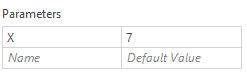
Then adding calculated columns AddOne = [Value + 1] and AddX = [Value] + {X} will result to:
|
Group |
Name |
Value |
AddOne |
AddX |
| X | A |
2.00 |
3.00 |
9.00 |
| X | B |
3.00 |
4.00 |
10.00 |
| Y | C |
4.00 |
5.00 |
11.00 |
Sample 1
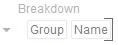
Below is the defined breakdown in a Table visualization:
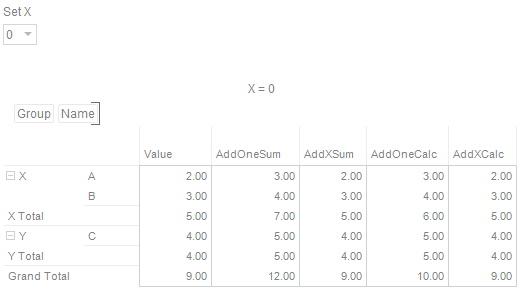
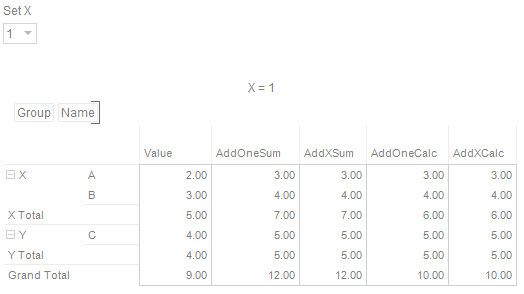
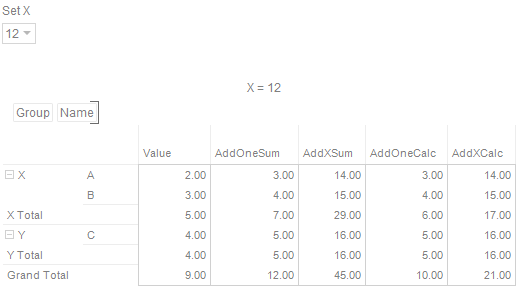
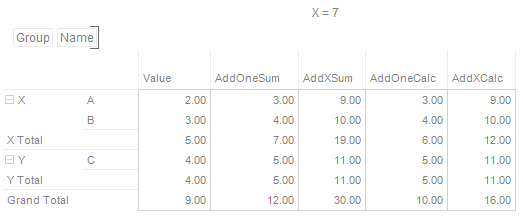
This Table visualization is showing the grouping of the columns based on the breakdown hierarchy with AddOneSum, AddXSum, AddOneCalc, AddXCalc as Visual Members with the corresponding aggregates and the X value set to 7:
|
Column |
Aggregate |
|
Value |
Sum |
|
AddOneSum |
Sum |
|
AddXSum |
Sum |
|
AddOneCalc |
Calculation |
|
AddXCalc |
Calculation |
Adding an Action Dropdown in the dashboard with a Set Parameter mode:
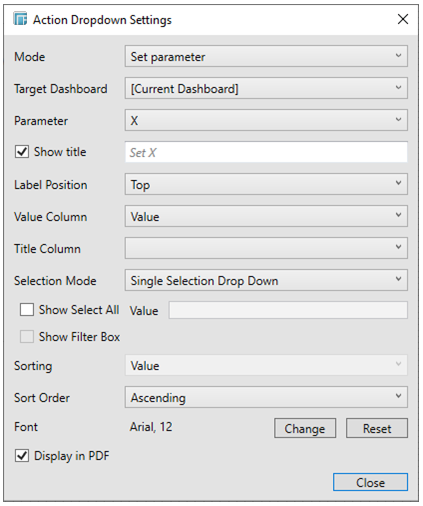
and given Table 2:
|
Value |
|
0 |
|
1 |
|
7 |
|
12 |
will result to these Table values: