Forces data collection
- Surface forces, obtained by nodal integration of dFmagS spatial quantity (surface magnetic force density). These forces can be computed only on surface supports that are situated at the interface between two regions with different magnetic permeability. For AC Steady State application, user has to specify the type of values to collect (continuous, instantaneous or pulsating). In advanced mode, the user must specify the method to compute the forces at the nodes, while in standard mode, this method is determined automatically by Flux.
- Volume forces, obtained by local integration of dFLapV spatial quantity (volumic Laplace force density). These forces can only be computed on volume supports. For AC Steady State application, user has to specify the type of values to collect (continuous, instantaneous or pulsating). In advanced mode, the user must specify the method to compute the forces at the nodes, while in standard mode, this method is determined automatically by Flux.
- Forces dedicated to rotating machines with mesh
import, obtained by integration of magnetic pressure on a
virtual cylinder in the air gap before applying them to the support nodes.
These forces can only be computed on cylinder or circular supports.
- The user should specify:
- A computation support for the data collect
- In the case where the user does not choose the automatic option (available in Flux 2D & Flux Skew) for the computation of the radius, the units and the value of the radius of the virtual cylinder in the air gap must be filled.
- The user can modify:
- the minimum number of integration points along the integration perimeter
- the minimum number of integration points along the Z-axis (in Flux 3D & Flux Skew only)
- the circle of local integration surrounding a node (enter 0 to force the optimal value computation)
- The user should specify:
- A data support compatible with the chosen collection type
- The step list for which the values need to be collected (complete scenario,
specific interval or single step)Note: If the collection is defined before the project solving, the user has to specify the scenario for which he wants to collect data. The data will be collected during the solving with the defined scenario.
Method of force integration at nodes
-
Direct integration at nodes: In this method, the magnetic pressure, dFmagS or dFlapV, is computed on the nodes of the mesh and is integrated on an equivalent surface viewed by the nodes in order to obtain a force. This surface is defined by the elements surrounding this node.
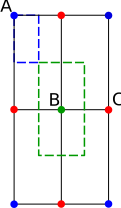 Figure 1. Simple uniform and regular first-order mesh with four
elements representing three types of nodes; A: a node on a
corner of the domain, B: a node in the center of the domain and
C: a node on the edge of the domain.
Figure 1. Simple uniform and regular first-order mesh with four
elements representing three types of nodes; A: a node on a
corner of the domain, B: a node in the center of the domain and
C: a node on the edge of the domain.In figure 1, the blue frame represents the area of the node A, while the green frame represents the area of the node B. As the magnetic pressure is computed on each node, the force at the node A located in a corner of the finite element can be written as follows:
The coefficient 1/4 represents the ratio between the surface viewed by the node A and the surface of the mesh elements. Noting Pi the pressure on i-th node and S the surface of the element, the forces computed on the nodes B and C are the next ones:
This approach is only available for 2D applications, by default this method is set in standard mode.
-
Integration in elements and equi-distribution at nodes: For this method, the forces are initially computed in each element by integration of the magnetic pressure at the Gauss points. Then, these forces are equally distributed between all of the nodes of the elements. In the figure 2, a mesh is represented with four different forces in four elements:
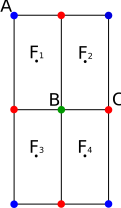 Figure 2. A mesh with four elements and one force per element.
In the figure 2, the contribution of forces at nodes A, B and C can be written as follows:
The node A receives the contribution of one element, the node B receives the contribution of four elements, and the node C receives the contribution of two elements, all equally distributed. This transformation keeps the fact that the sum of the forces at the elements is equal to the sum of the forces at the nodes.
This approach can be used for all applications. This method is used by default in standard mode for Flux 3D and Flux Skew applications.
-
Integration in elements and extrapolation at nodes: In this approach, the force is also obtained by integration of the magnetic pressure in the elements however, this force is extrapolated at nodes with a statistical average established on the neighboring elements of the node. A coefficient α, equal for all the nodes, is introduced afterwards in order to guarantee that the sum of the forces at the nodes is equal to the sum of the forces at the elements.
In the case of the figure 2, the force on the node B can be expressed as follows:
Then at nodes A and B we have: