


|
Creating OneTick CEP Input Data Source
The OneTick CEP connector allows connection to OneMarketData OneTick tick history databases on a streaming subscription basis. The connector supports either:
q Execution of a specified OTQ
q Execution of a specified parameterized OTQ
q To use the OneTick CEP connector, it requires a JAR file to be added and some configurations to be performed. Further details are provided in the Panopticon Visualization Server Installation and Troubleshooting Guide.
Steps:
1. In the New Data Source page, select Input > OneTick CEP in the Connector drop-down list.
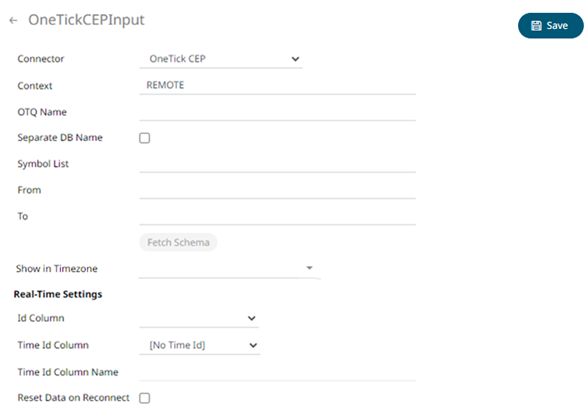
2. Enter the Context (for example, REMOTE).
3. Enter the OTQ Name.
4. Check/uncheck the Separate DB Name box.
5. Click  to
populate the Id Column list box.
to
populate the Id Column list box.
6. From this list box select the field which will define a unique data record to subscribe against.
If an OTQ is selected, the list of input parameters that the OTQ expects is exposed, as well as the input parameters specific to the selected OTQ, the following are generic to all OTQs
· Symbol List
· From
· To
These add additional filter criteria such as symbol, and time window onto the basic OTQ.
7. The time zone of input parameters and output data is by default, unchanged. Changing the time zone is supported by using the Show in Timezone drop-down list box based on the assumption that data are stored in UTC time and outputs are presented in the selected time zone.
8. If the Type is selected as Text, it will be listed in the Id Column drop-down list box and can be used to select a key column to manage data updates and inserts.
Note: Every message definition needs a text column to be defined as the ID column. By default, only the latest data will be loaded into memory.
Furthermore, a streaming time series window can be generated by creating a compound key with the Id Column, plus a separately specified Time ID column. This Time ID column can be from the source dataset, or alternatively automatically generated.
If the Time Id column is selected, then a scrolling time window can be specified.

For Automatic Time Id, define the Time Id Column Name.
As new data arrives from the subscription new time slices will automatically be added, and old ones will be deleted.
If a new ID is received, a new row is added to the in-memory data set representing the ActiveMQ topic subscription. While if an existing ID is received, an existing row is updated.
9. Check the Reset Data on Reconnect box to flush out the stale data and reload data after reconnection.
10. Click  .
The new data source is added in
the Data Sources list.
.
The new data source is added in
the Data Sources list.