


|
Creating Data Extract from Python
The Python connector allows the retrieval of output data from a Python Pyro (Python Remote Objects) process.
For Python connectivity, Python must be first installed, together with the latest version of Pyro4. In addition, Pyro must be initiated manually or through using the batch file start_Python_connectivity.bat.
If the scripts utilize additional modules such as Numpy & Scipy in the shipped example, these also need to be installed into the existing Python installation.
Steps:
1. On the New Data Extract page, select Python in the Connector drop-down list.
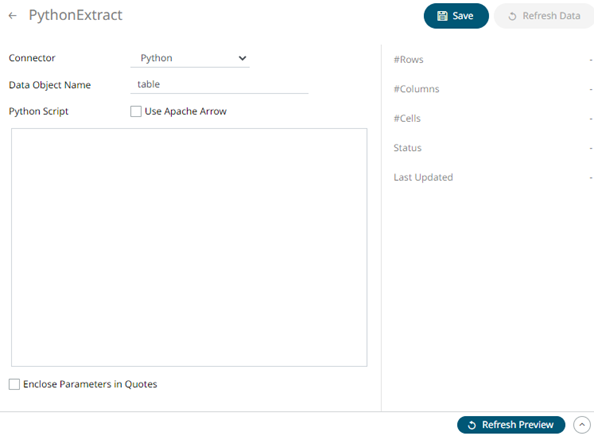
2. Enter the following properties:
|
Property |
Description |
|
Host |
Python Pyro instance host address. |
|
Port |
Python Pyro host port. Default is 9090. |
|
HMAC Key |
Set to password. |
|
Data Object Name |
The data structure (list of dictionaries) that Panopticon will produce, and then will be utilized by the Python Script. |
3. Select the Serialization Type: Serpent or Pickle.
· Serpent – simple serialization library based on ast.literal_eval
· Pickle – faster serialization but less secure
Modify the configuration.py file located in ..\Anaconda3\Lib\site-packages\Pyro4 to specify the serialization to be used.
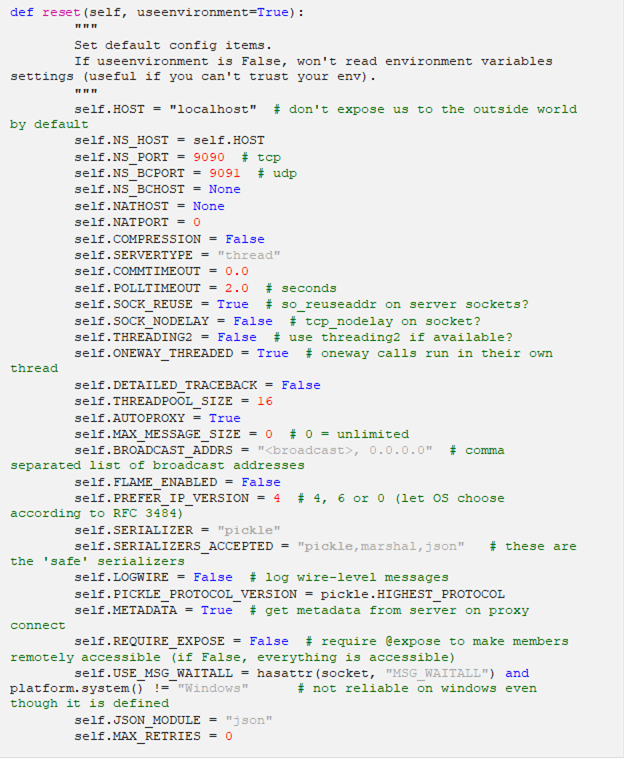
For example, if Pickle is selected, self.SERIALIZER value should be changed to pickle and self.SERIALIZERS_ACCEPTED value should be changed to include pickle:
4. Select whether the parameters should be automatically enclosed in quotes by checking the Enclose parameters in quotes box.
5. Enter the required Python script to execute on the active Pyro instance.
6. Click  to save and display the details of the data extract.
7. Click
 then
then  to display the data
preview.
to display the data
preview.