Thomson Reuters TREP-RT
The Thomson Reuters TREP-RT connector allows connection to the RFA data infrastructure on a real-time streaming basis.
To use the TREP-RT connector, the TREP-RT client libraries should be added as follows:
For 64-bit installations:
-
Copy the following files to the Designer plugin installation folder. TREP-RT connector installation folder (typically found at C:\Program Files\Datawatch Desktop\Plugins\Panopticon.RMDSplugin):
-
-
RFA7_NET100_x64.dll
-
enumtype.def
-
RDMFieldDictionary
-
-
Copy the following to the root folder of the Panopticon Designer (Desktop) (typically found at C:\Program Files\Datawatch Desktop\Designer).
-
-
RFA7_MsgFile100_x64.dll
-
For 32-bit installations:
-
Copy the following files to the TREP-RT connector installation folder (typically found at C:\Program Files (x86)\Datawatch Desktop\Plugins\Panopticon.RMDSplugin):
-
-
RFA7_NET100.dll
-
enumtype.def
-
RDMFieldDictionary
-
-
Copy the following to the root folder of the Panopticon Designer (Desktop) (typically found at C:\Program Files (x86)\Datawatch Desktop\Designer).
-
-
RFA7_MsgFile100.dll
-
Using Thomson Reuters TREP-RT
-
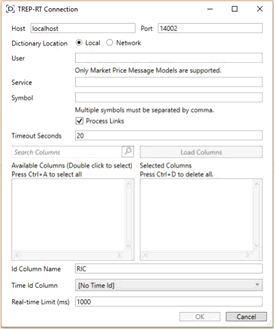
When creating a new data table, select Thomson Reuters TREP-RT from the Connect to data dialog. The TREP-RT Connection dialog displays.
-
Enter the following information:
-
-
Host & Port
-
DACS User
-
Service
-
Symbol(s) to subscribe against
-
Chain constituents can be received if the Processed Links box is checked.
NOTE: All of these entries can be parameterized.
-
Click Load Columns to return a list of available columns for the service.
-
Double-click to select the required columns.
-
Enter the ID Column Name. This will default to RIC.

By default only the latest data will be loaded into memory.A streaming time series window can be generated by creating a compound key with the Id Column, plus a separately specified Time ID column.

This Time ID column can be from the source dataset, or alternatively automatically generated.
If the Time Id column is selected, then a scrolling time window can be specified. As new data arrives from the subscription new time slices will automatically be added, and old ones will be deleted.

-
Modify the Real-time limit to vary the data throttling. This defaults to 1000 milliseconds.

-
Click OK. The source table is returned in Data Prep with the TREP-RT title, and the fields displayed in the Data Source Preview.