



|
The Options Interface
The Options interface allows users to configure several universal Monarch settings, including Folders, input information, views, and exports, among others.
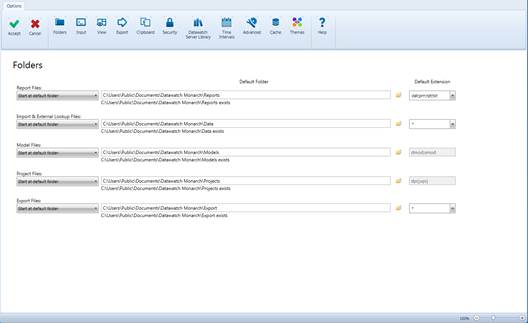
Figure 6-1. The Options window.
Clicking specific buttons on the Options ribbon exposes settings you can modify. When you have modified the settings as you wish, simply click Accept  to accept your changes and close the interface. You may specify several options before selecting Accept
  . Select Cancel
  to disregard any changes you made and close the interface. In this case, none of the previous settings are modified.
The following table summarizes the functions of each of the buttons in the Options ribbon.
|
Use this button… |
To… |
|
|
Accept the changes you made and close the interface |
|
|
Cancel the changes you made and close the interface |
|
|
Expose folder settings |
|
|
Expose input settings |
|
|
Expose view settings |
|
|
Expose export settings |
|
|
Expose clipboard settings |
|
|
Expose security settings |
|
|
Expose Datawatch Server Library settings |
|
|
Expose time interval settings |
|
|
Expose advanced settings |
|
|
Expose caching options |
|
|
Expose theme settings |
|
|
Launch the Help file |

 Folders
 Input
Input View
View Export
 Security
 Time Intervals
 Advanced
 Cache
Cache
 Help
Help
More information on each of the settings available in the Options window is available here.