



|
Exporting to Tableau Server
Data Prep Studio allows you to export to or update existing worksheets in Tableau Server.
However, to be able to do so successfully, you need to have installed the Tableau TABCMD program first. Click here to download and learn more about the utility.
To export data to Tableau Server, follow the steps outlined below.
Steps:
1. Select the table you wish to export and then click Export Data from the Data Prep Studio toolbar.
2. In the Export dialog that displays, click Tableau Server. The Tableau Server Export dialog displays.
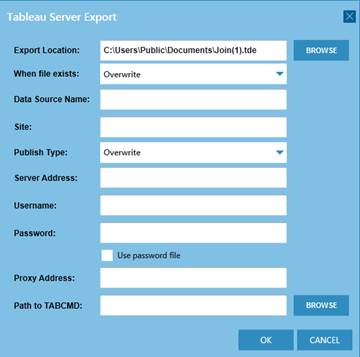
Figure 4-108. The Tableau Server Export dialog.
3. Enter all of the required information and then select OK.
More information on exporting to Tableau Server may be found here.