



|
Using Fuzzy Joins
When joining data, Data Prep Studio makes an allowance for potential errors in spelling that would result in a mismatch even when the keys are highly similar (e.g., "bond" vs. "bund"). Such issues are addressed by using fuzzy joins.
Fuzzy joining is activated by ticking the Use Fuzzy Matching checkbox located near the bottom of the Join Configuration dialog.
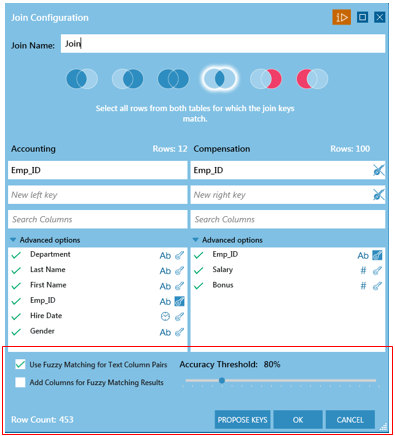
Figure 4-55. Activating Fuzzy Matching in the Join Configuration dialog.
The options that display when fuzzy matching is employed allow you to specify an accuracy threshold for matching and whether or not to include columns detailing the fuzzy matching results in the table obtained from the join.
Note that join keys MUST be defined before fuzzy matching can be accomplished.
More information on fuzzy matching may be found here.