



|
Using the Datawatch Data Connectors
Data Prep Studio allows you direct access to a wide variety of database types through a set of built-in data connectors.
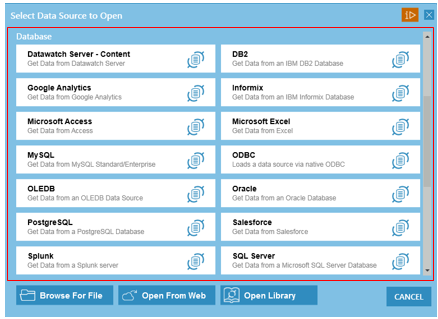
Figure 4-31. The Datawatch data connectors.
Data Prep Studio allows you to access data from the following database sources:
|
q Microsoft Access |
q Oracle |
|
q IBM Cloudant |
q Salesforce |
|
q DB2 |
q SQL Server |
|
q Informix |
q Splunk |
|
q Microsoft Excel |
q Monarch Server – Content |
|
q MySQL |
q OLEDB |
|
q Oracle |
q ODBC |
|
q Google Analytics |
|
It also allows you to access data from the following big data sources:
|
q IBM Cloudant |
q Cloudera Impala |
|
q MongoDB |
q Sybase IQ |
|
q Amazon Redshift |
q Hadoop Hive |
Finally, data from other sources, such as Business Objects Universe and OData, are also supported in Data Prep Studio.
To connect to any of these sources quickly and successfully, Data Prep Studio makes use of data connectors.
To obtain access to data using this connector, specific information, including host name, server name, user ID, password, and database name, among others, is necessary. Which information you need will depend on the database to which you are attempting to connect. If you wish to use any of the data connectors, contact your database administrator to obtain the necessary connection details.