



|
Adding Data from Excel Files
Excel files may be added to your workspace via the Select Data Source to Open dialog or simply dragging and dropping the file into the Start Page, Preview Data window, or Prep Data window.
When opening Excel files, the Excel Explorer dialog displays.
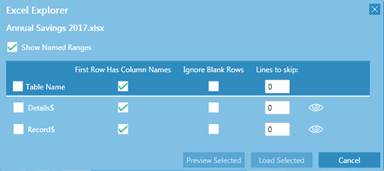
Figure 4-26. The Excel Explorer dialog.
This dialog is used to specify which tables to open and how the data should be displayed. When the necessary specifications have been provided and Load Selected is clicked, the table(s) open as usual and they can be previewed and loaded to the Prep Data window.
More information on the Excel Explorer dialog may be found here.