



|
Setting Fullwidth Character Mode
The Fullwidth Character Mode setting toggles Fullwidth Character Mode on and off. While on, all characters will be rendered in the same horizontal space as a Kanji glyph.
Most fonts do not contain glyphs for every character from every language. This issue is addressed by a fallback architecture that renders unknown characters in standard fonts known to contain those characters. The result is text that is drawn in multiple fonts as needed on a per-character basis.
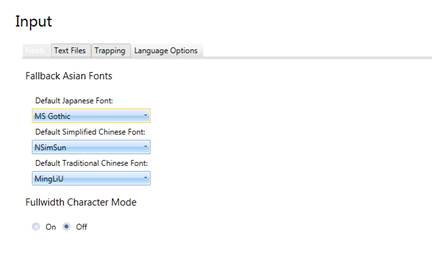
Figure 23-1. Setting Fullwidth Character Mode on via the Options window.
To set Fullwidth
Character Mode on, simply select Options > Input
from the Home screen that displays when Monarch is launched. Select
Accept  to save your settings when you are finished.
|
|
NOTE All other settings for dealing with Japanese input files are applicable only when this setting is enabled. |
|
