



|
[23] Working with Asian (CJK) Character Sets
Displaying fullwidth characters (e.g., Chinese/Japanese/Korean, or CJK, characters) is more complex than displaying standard fixed-width single byte character set (SBCS) characters. This stems from the fact that fullwidth characters usually take up nearly twice as much horizontal space in pixels to display. Due to the grid-like nature of Monarch’s unique trapping process, Monarch requires that all characters are rendered with the same amount of screen space in order for characters to align vertically. This requirement causes issues when SBCS and fullwidth characters are present on the same report.
Notice the indeterminate alignment of these lines:
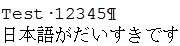
Now observe the grid-like alignment of these lines:
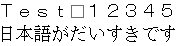
As you can see in the first example, the characters do not line up in any meaningful way. Thus, it is impossible to create a template that traps consistently in this situation. By contrast, in the second example, each character takes up the same amount of space, thereby giving us a grid-like 1-to-1 alignment and making it possible to trap data with predictable results. This is the fundamental challenge that Fullwidth Character Mode addresses.
Working with Asian Character sets may be easily accomplished by specifying four settings:
q Fullwidth Character Mode
q Fallback Asian fonts
q Date/Time format
q Ignore Character Width