



|
Working with Pivot Tables
When we selected pivot table fields in the earlier part of this chapter, we were specifying settings similar to those used when creating a summary. For example, the Row Labels specify down keys, the Column Labels specify across keys, and the Values specify measures.
Clicking on the drop-down buttons on either the Row Labels or Column Labels fields displays a set of options that allow you to sort and filter your data.
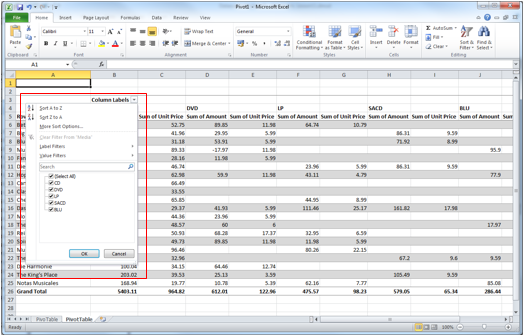
Figure 22-6. Options for sorting and filtering pivot table data.
To display the unit prices and amounts for only the media types DVD and BLU, for example, simply click on the drop-down button of Column Labels, deselect the boxes for CD,LP, and SACD, and then click OK. When you do this, the Select All checkbox is automatically deselected.
A new table is rebuilt and displayed in your spreadsheet.
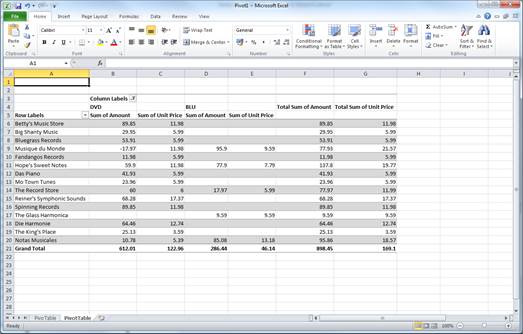
Figure 22-7. The new pivot table showing only unit prices and amounts for the media types DVD and BLU.