



|
Upper Limit Values
While the Values from table option lets you select the exact values you want to use in your summary, sometimes you want to group values into ranges, such as weekly or monthly periods. This capability is provided via the Upper Limit Values option. This option lets you define an upper limit for each range of values. An example of this can be seen in the Sales by Ship Date summary.
Steps:
1. Click on the Sales By Ship Date summary in the Summary Selector.
2. Select Autosize Columns
 from the Summary tab to
view all the fields properly.
from the Summary tab to
view all the fields properly.
The Sales by Ship Date summary displays. This summary breaks out sales for all customers across four weekly periods during the month of April 2010. We created this summary by using the dates 04/07/2010, 04/14/2010, 04/21/2010, and 04/28/2010 to define the ending dates for each weekly period.
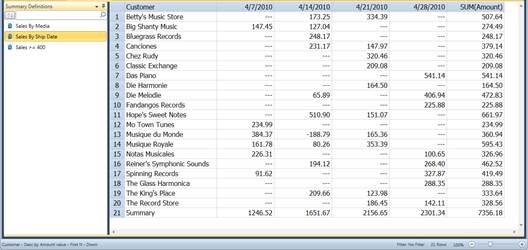
Figure 17-15. Using upper limit values to break down ship dates into weekly periods.