



|
Adding Item Fields
Item fields are optional fields that you can use to expand a summary to show individual transactions. Item fields provide an advantage over viewing individual transactions in the Table view because you can use the summary to break down subtotals.
Let’s add the Quantity and Description fields to our summary definition as item fields.
Steps:
1. Select Summary Design > Add/Remove Fields.
2. Select Quantity from the Table Fields list that displays, and then select Add Item.
3. Select Description from the Table Fields list and then select Add Item.
4. Choose Accept  to
accept the modified summary definition.
to
accept the modified summary definition.
Monarch rebuilds the summary and displays the item fields.
5. Select Autosize Columns
 to view all the fields properly.
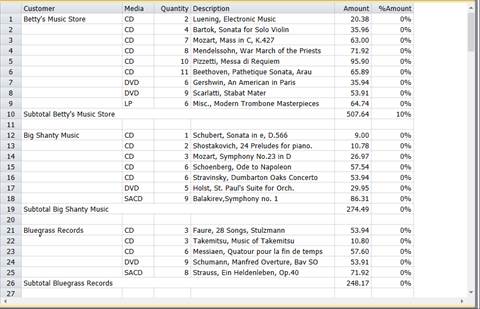
Figure 16-14. A newly constructed summary showing item fields.